Loyalty, Budgets and B2B for Shopify

Loyalty that spends like money.

Customers spend their points or money balance in any amount, with one press, at checkout and at your register. The same wallet runs Budgets for your team and your clients, and the balances of the companies you sell to.

Checkout · exampleLive

Available balance

$48.20

Any amount, in one press. Nothing leaves the balance until Shopify marks the order paid.

Shopify brands running on Shopwaive

The platform

One wallet behind every reward, allowance and company account.

How will you run Shopwaive?

Run loyalty, team wallets and company balances from one app. Every tile below is live today.

Everything Shopwaive does, surface by surface

Loyalty Live

Run loyalty on a balance customers can spend.

Show the balance as points or as money, at a rate you set. Customers spend any part of it, and each deposit can carry its own expiry date.

  • Points or money, one display unit per store Live
  • Earning rules built in Shopify Flow Live
  • An expiry date on every deposit Live
How loyalty works on Shopwaive
Customer account · example

Your rewards

1,240 pts

Worth $12.40 at this store's rate of 100 points to $1.00

  1. Welcome bonus+200 ptsExpires 31 Dec 2026
  2. Review reward+500 ptsExpires 31 Jan 2027
  3. Order #1042+540 ptsExpires 30 Apr 2027

Each deposit keeps its own expiry date. Example amounts at this store's rate.
Checkout and register Live

Any amount, one press, wherever they pay.

The same balance works in Shopify checkout and at Shopify POS. It leaves the account only when Shopify marks the order paid, so an abandoned checkout takes nothing.

  • One-press Redeem block in checkout Shopify PlusCheckout plan
  • A gift code that can pay the whole order, taxes and shipping included, with nothing to type Shopify Plus
  • Account tile at the register applies the balance up to the total due Live
See checkout and POS
Example
  1. The shopper presses Redeem and picks how much to use.
  2. The amount comes off the order total.
  3. Shopify marks the order paid. Only then does the balance go down.

Step 1 of 3. Balance $48.20. Nothing has been taken.

Your team and clients Live

Budgets for your team, billed by PO.

Staff get balances and budgets of their own, so you never run your team through your customer rewards. With Budgets, one person holds several named budgets, each with its own amount, expiry date and PO number, and you download one month-end file by budget and PO.

  • Several named budgets on one account, each with its own expiry date, or none Live
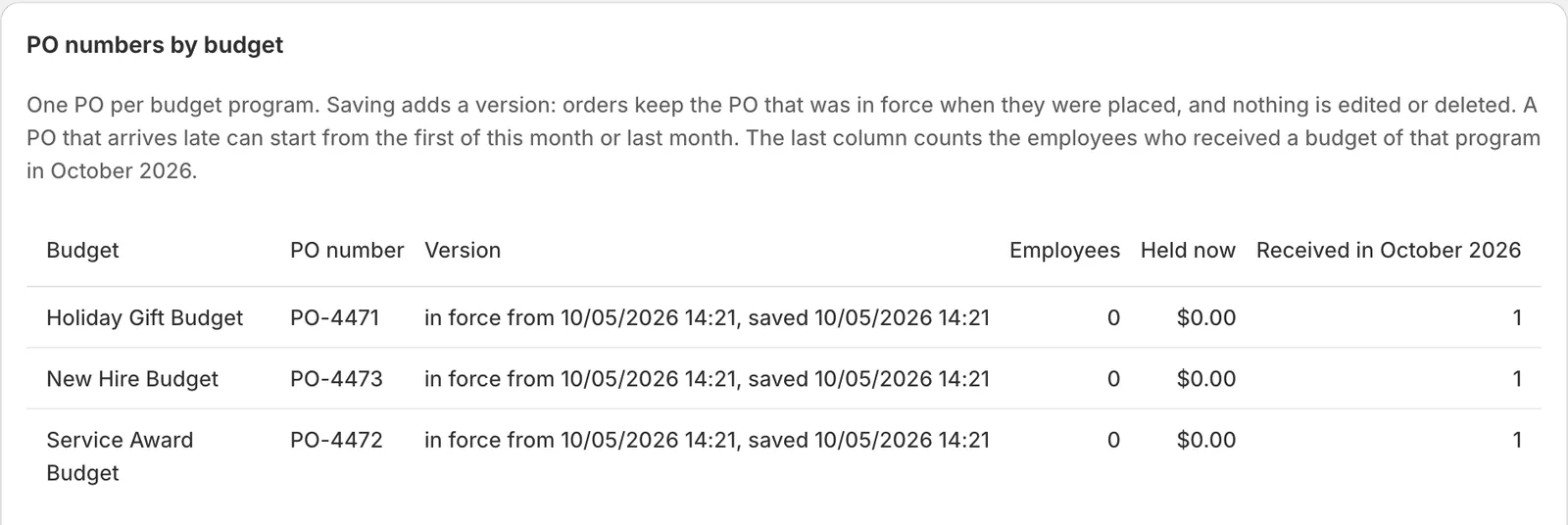
  • A PO number for each budget, and a month-end file with totals by PO Live
  • Spent at checkout and in Shopify POS, with a record of which budget paid, to the cent Live
How Budgets works
Where they pay

Shopper

Maya R.

Loyalty balance

$48.20

Earned on paid orders

Team member

Jordan K.

Uniform allowance

$100.00

Expires 1 Jan 2027 · PO-1001

Apply a balance, then pay or abandon, to see when money actually moves.

Example people, budgets and amounts, shown in money. Budgets is live; you switch it on in Shopwaive's settings. A buyer picks one budget for each order.

Companies Live

Wallets for the companies you sell to.

A company's wallet is shared with its buyers through a customer segment, and they spend it at checkout. Your exports show who placed each order and who funded it.

  • Company wallets spent at B2B checkout Shopify PlusFeature charge
  • A Flow action that creates the segment deciding who can spend Live
  • The balance converted to the checkout currency at Shopify's rates Feature charge
  • The balance applied to draft orders taken by phone or in person Live

A buyer who belongs to more than one company account uses the first one that applies.

B2B company wallets
B2B checkout · exampleShopify Plus

Example Co. (a client company)

Company wallet

$4,800.00

The wallet's own currency. Buyers paying in another currency see it converted at Shopify's rates.

  • LDL. Duarte, wallet holder
  • ACA. Chen, buyer
  • ROR. Okafor, buyer
Recent company orders, example
OrderPlaced byFunded byAmount
#2207A. ChenCompany wallet$640.00
#2213R. OkaforCompany wallet$212.50
#2219A. ChenCompany wallet$1,105.00

API Checkout plan

Plug the balance into the rest of your stack.

Your developers get a REST API, an Order API for headless stores, and keys they can create and revoke.

  • A REST API with several revocable keys Checkout plan
  • An Order API that creates Shopify orders with the balance applied Checkout plan
  • Zapier: one trigger and four actions Live
Developers
Get a customer's balance
curl --location 'https://app.shopwaive.com/api/customer/customer@example.com' \
  --header 'X-Shopwaive-Access-Token: YOUR_API_KEY' \
  --header 'X-Shopwaive-Platform: shopify'

From the API quick start. Merchants create and revoke keys in the app under Settings, Develop.

Real screens

See exactly what you get

Screens captured on our own development stores. Nothing is drawn in or painted over; crops leave out test people and other brands.

The Budgets page in the Shopwaive app: PO numbers by budget, listing each budget with its PO number, the version in force, employees, the amount held now and the budgets received this month.
Real screen The Budgets page in the Shopwaive app: one PO number for each budget, saved as versions so every order keeps the PO in force when it was placed. The Shopwaive app in Shopify admin, our development store, 5 Oct 2026.
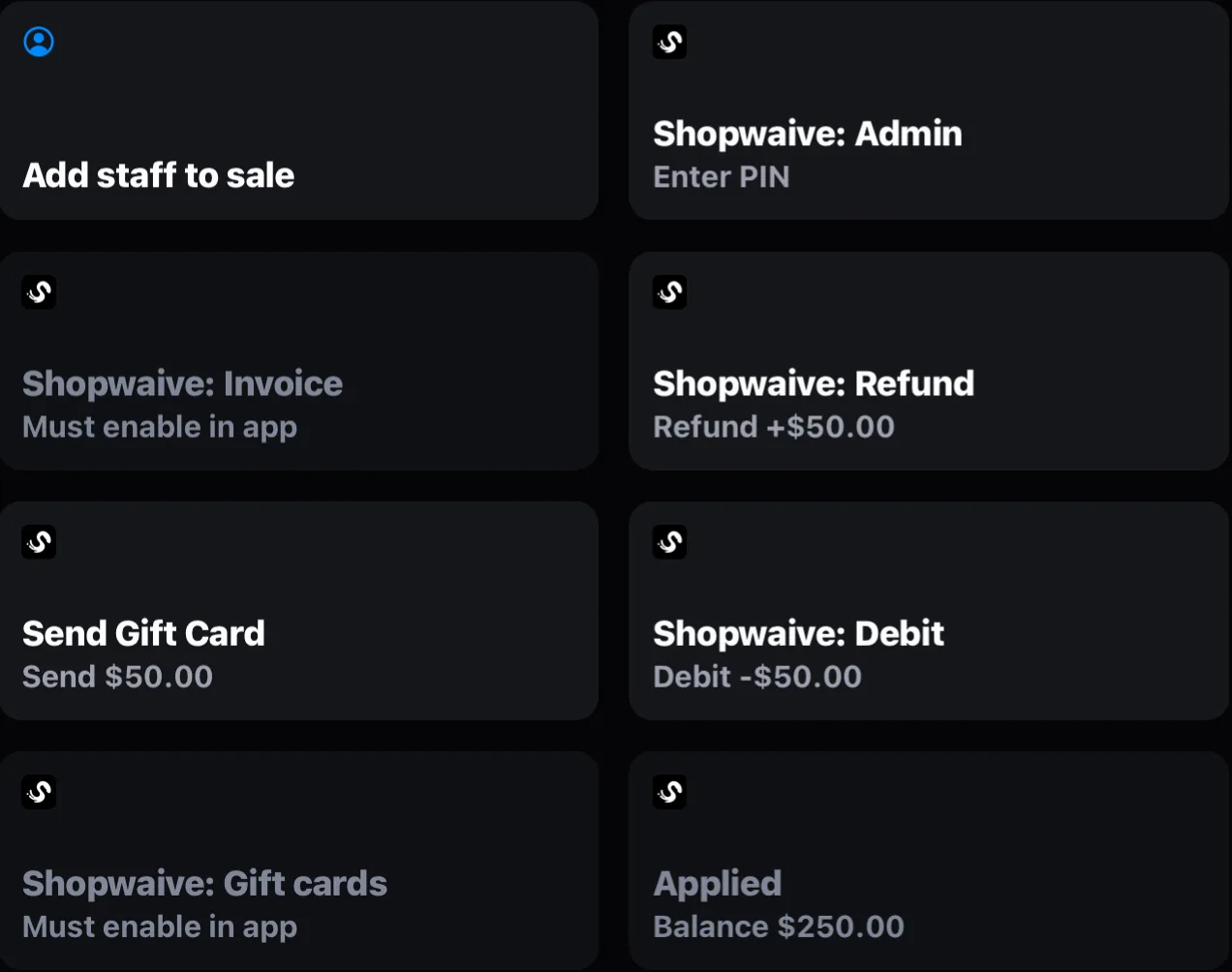
Shopify POS on an iPad with the Shopwaive tiles in the smart grid: Admin, Invoice, Refund, Send Gift Card, Debit, Gift cards, and the Account tile showing a balance of $250.00 applied to the sale.
Real screen Shopwaive's tiles in the Shopify POS smart grid: Refund, Debit, Send Gift Card, and the Account tile with a balance applied to the sale. Shopify POS on an iPad, our development store, 4 Oct 2026.
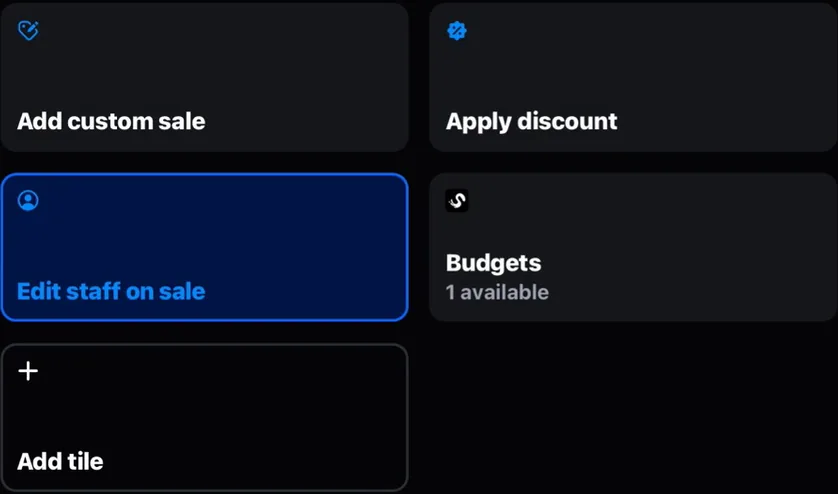
Shopify POS smart grid with the Shopwaive Budgets tile reading 1 available, beside Add custom sale, Apply discount and Edit staff on sale.
Real screen On a Budgets store the Shopwaive tile reads Budgets and shows how many budgets the buyer can use. Shopify POS on an iPad, our development store, 5 Oct 2026.

Why Shopwaive

Brands pay value to more people than shoppers.

A Shopify brand pays value to more people than its shoppers: its own team, the companies that buy in volume, and the partners who send it customers. Shopwaive gives all of them a balance on one system, and runs loyalty on that same balance.

Use it as your loyalty platform, or run it beside the points app you already have.

11

Shopwaive actions in Shopify Flow, on any paid Shopwaive plan, with 3 triggers beside them.

  • Increment balance
  • Set balance
  • Create gift code
  • Create segment
  • Earn commission
  • Void deposits

See every action and trigger, each with what it does.

Four ways brands run Shopwaive

  • Loyalty platform

    A full loyalty program

    Points or money, spent in any amount at checkout and at the register.

    Loyalty
  • Beside your app

    Or next to the one you have

    Keep your current points app. Shopwaive covers staff, companies, returns paid to a balance and the register.

    Run it beside your app
  • Customers and staff

    One system, two audiences

    Staff get their own balances and Budgets with PO numbers, outside the program your shoppers see.

    Budgets
  • Complex programs

    Segments, Flow and B2B

    Segment deposits with dates, company wallets, currency conversion at checkout and an API from the Checkout plan.

    B2B

Compare

Weighing loyalty apps? Compare row by row.

Our comparison pages set Shopwaive beside other Shopify loyalty apps, one page each. Every fact about another app links to that company's own page, with the date we checked it, and the rows where it is ahead stay on the page.

  • Any amount in one press, online and at the register
  • Nothing leaves the balance until Shopify marks the order paid
  • Budgets for your team and wallets for the companies you sell to
  • 11 actions and 3 triggers in Shopify Flow

See the comparisons

Use cases

What brands run on one wallet.

1 of 7

  • Loyalty

    Points for every paid order

    A Flow workflow adds points when Shopify marks an order paid. Customers spend any amount at checkout or at the register.

    • Shopify Flow
    • Checkout
    • POS
  • Budgets

    Budgets billed on a PO

    An agency runs a store for a client. Each budget carries the client's PO number, and the month-end file totals every order by PO.

    • Budgets
    • Month-end file
  • Team

    A balance for new hires

    Tag a new team member and a workflow deposits a welcome balance to spend in your own store.

    • Shopify Flow
    • Staff
  • Team

    A monthly allowance

    Give a staff segment an allowance that starts on the first of the month and ends on the last day.

    • Segments
    • Dated allowances
  • B2B

    Wallets for corporate clients

    Each client company holds a wallet its buyers spend at checkout. Exports show who placed and who funded every order.

    • B2B checkout
    • Shopify Plus
  • Service

    Returns paid back to a balance

    At the register, the Refund tile adds the value of returned items to the customer's balance. In the admin, use Give credit on any order.

    • POS
    • Admin
  • Sales

    Phone and showroom orders

    Staff apply the customer's balance to a draft order in the Shopify admin with one link.

    • Draft orders
    • Admin

Shopify Flow

11 Shopwaive actions in Shopify Flow.

Flow is where Shopify brands automate their stores. Shopwaive adds 11 actions and 3 triggers, so loyalty, allowance and B2B rules run on the triggers your store already has. Every one works on any paid plan. Shopwaive's own Flow emails come with the Checkout plan.

Start from a recipe

TriggerOrder paidShopify trigger
ActionIncrement balanceShopwaive action

When an order is paid, Increment balance adds the amount you set to the customer's balance.

Actions Live

  • Increment balanceAdd to a balance, or take from it with a negative amount.
  • Set balanceSet a balance to an exact figure.
  • Create discountCreate a discount code, and email it if you choose.
  • Create gift codeCreate a gift code, and email it if you choose.
  • Create segmentCreate a customer segment from a query and a name.
  • Send emailEmail customers their balance with a link to redeem it.
  • Send HTTP requestCall any web service and use its response.
  • Earn commissionDeposit commission on eligible orders and sign-ups, once switched on in the app.
  • Refund balanceReturn what a customer redeemed on an order.
  • Void depositsCancel what an order or line item earned, after a refund or cancellation.
  • Shopify store creditAdd or remove Shopify's native store credit.

Triggers Live

  • Balance changeStarts a workflow when a customer's balance changes.
  • Balance changes from orderStarts a workflow when an order changes a balance.
  • HTTP POSTStarts a workflow when your own system posts to Shopwaive.

Questions

What brands ask first.

Short answers. The Help Center has the long ones.

What is Shopwaive?

Shopwaive is a Shopify app that gives customers, staff and B2B buyers a balance they spend in your store. Loyalty programs, team allowances and company wallets all run on that balance, at checkout and at Shopify POS.

Is Shopwaive a loyalty app?

Yes. Customers earn a balance shown as points or money and spend any amount of it in one press. You set earning rules with Shopify Flow.

Can I use Shopwaive alongside my current loyalty app?

Yes. Keep your points app for shoppers and use Shopwaive for staff wallets, company wallets, returns paid to a balance and any-amount spending at the register. Plan for three things. Your points app may award fewer points on the part of an order paid from a Shopwaive balance. Shoppers may see two balances, so name each by its purpose. If both apps pay into Shopify's native store credit, shoppers see one combined figure.

Can employees have their own wallets?

Yes. Staff get their own balances, each deposit with its own expiry date. With Budgets, one person holds several named budgets, each with its own amount, expiry date and PO number, and you download a month-end file by budget and PO. They spend them at checkout and in Shopify POS.

Does Shopwaive work at Shopify POS?

Yes. Seven Smart Grid tiles handle balances at the register: Account, Refund, Debit, Invoice, Admin, Redeem Gift Cards and Send Gift Cards. The Account tile applies the customer's balance up to the total due.

When does the balance leave a customer's account?

When Shopify marks the order as paid. An abandoned checkout takes nothing, online or at the register.

How much does Shopwaive cost?

There are three plans, Starter, Pro and Checkout, each with a 7-day free trial. Current prices are on our Shopify App Store listing, which is where you subscribe. The pricing page lists what each plan includes.

Put every reward on one wallet.

Install Shopwaive from the Shopify App Store and start a 7-day free trial, or book a demo and we will map your loyalty, team and B2B needs to one wallet.

Install on Shopify

Book a demo

Tell us your store and what you want to run. It goes to support@shopwaive.com, and we reply by email with times for a call.

We show points on the balance at checkout and at the register, and the Shopify Flow recipes that add them.