Named budgets for each person
Each budget is its own line at checkout, with its name, the amount left and its expiry date.
Budgets
Give each employee or client program several named budgets, each with its own amount, expiry date and PO number. Buyers redeem them online and in Shopify POS, and you download one month-end file by budget and PO.
An example
At checkout the employee sees three lines, one for each budget, and presses Redeem on the one that should pay. A $40.00 order paid from Uniform allowance leaves $60.00 on that budget. The other two are untouched, and your month-end file lists the order under Uniform allowance and PO-1001.
| Budget | Amount | Expiry date | PO number |
|---|---|---|---|
| Uniform allowance | $100.00 | January 1, 2027 | PO-1001 |
| Safety gear | $50.00 | April 1, 2027 | PO-1002 |
| Service award | $50.00 | None | PO-1003 |
Try it
Pick a budget and press Redeem, place the order, then refund it. Watch which budget pays, what it has left, and the rows your month-end file would carry.
Your budgets
Press Redeem on the budget that should pay.
Month-end file · Budget usage
| Order | Budget | PO number | Amount |
|---|---|---|---|
| No orders yet this month. | |||
Example budgets from our Help Center. Amounts in your store currency.
What you get
Each budget is its own line at checkout, with its name, the amount left and its expiry date.
The buyer picks the budget. If they change their mind before they pay, the budget picked last is the one charged.
An order comes off the budget that was picked. A partly used budget keeps the rest, and Shopwaive records which budget paid, to the cent.
Refund items of an order redeemed as a discount code and the budget's share of them returns to the same budget, through one Shopify Flow workflow you set up once.
Each budget ends on its own date, or never. The budgets on one account end independently of each other.
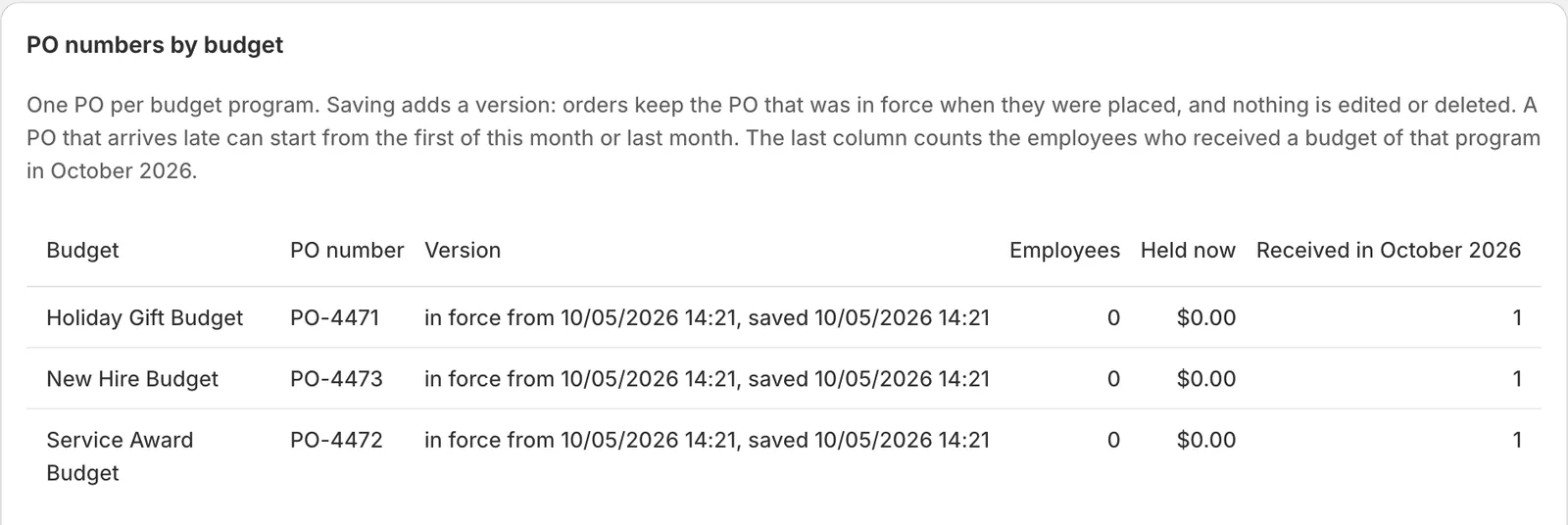
You save it once. Saving a new one adds a version: orders keep the PO that was in force when they were placed. Buyers never see it.
One CSV with every order by employee, budget, PO number and amount, refunds as negative rows, and totals by PO. You can download it only after it matches Shopwaive's own records to the cent.
Each row says how the order was redeemed. Rows redeemed as discount codes can show a tax accrual, as information for your accountant and tax adviser.
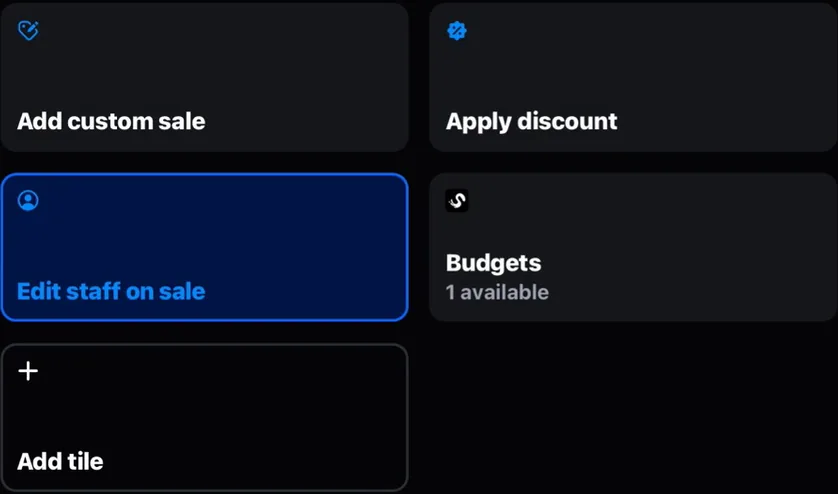
The same budgets work at the online checkout and in Shopify POS, where the Shopwaive tile reads Budgets and opens the buyer's list.
Real screens
Captured on our own development stores. Nothing is drawn in; crops leave out test people and other brands.
Who it suits
Requirements
| Online checkout | Shopify Plus. Shopify allows apps on the information, shipping and payment steps of checkout only on Shopify Plus. |
|---|---|
| Shopify POS | Any Shopify plan that includes Shopify POS. Shopify Plus is not needed in store. |
| Shopwaive plan | The Redeem checkout block is part of the Shopwaive Checkout plan. See pricing. |
| Shopify Flow | Refunds return to a budget through one Shopify Flow workflow. |
| Customer accounts | At the online checkout, budgets show only to a signed-in buyer. |
| Balance type | The Balance theme, with balances kept in your store currency. Budgets do not work with the Loyalty and Rewards theme. |
| Switching it on | The Budgets switch on the Checkout tab of Shopwaive's Settings, once the checkout block, the POS tile and the refund workflow are in place. |
For developers
The Customer API returns a customer's budgets in its offers object when you add ?offers=true; each budget's name is its note. Use the Action API to edit or delete one.
Questions
Budgets gives one person several named budgets on a single Shopwaive account. Each budget has its own amount, its own expiry date and its own PO number. The buyer picks one budget for each order, online or in Shopify POS, and at month end you download one file by order, employee, budget and PO.
No. You save one PO number for each budget in the Shopwaive app. It is printed in your month-end file on every order and refund of that budget, and buyers never see it.
When you refund items of an order redeemed as a discount code, the budget's share of them returns to the budget that paid, through one Shopify Flow workflow you set up once. Every sale in Shopify POS is redeemed as a discount code.
No. Each budget ends on its own date, or never. A partly used budget keeps the rest until its own date.
Add the checkout block, the POS tile and the refund workflow, then switch on Budgets on the Checkout tab of Shopwaive's Settings. The Help Center's Budgets set-up page takes you through each step, and you can book a demo for a walk-through.
Book a demo and we will map your programs and POs to budgets with you, or install Shopwaive and switch Budgets on in its settings.